Sunday, January 17, 2016

4 Tools to Create Interactive Content in Minutes

tools-create-interactive-content-cover

If we take a quick glimpse into the crystal ball, we see a future of content marketing less about the impact of words and more about the experiences created for the consumer. Traditional content has flooded the Internet and is starting to feel stale. Admit it – how often do you find yourself briefly skimming an article only to move on within seconds to something new?

Brands are coming to terms with this reality, fostering tools that engage their audiences in an activity – answering quizzes, watching clips, or exploring scenarios. It’s the perfect way to capture the audience’s attention from the get-go. It can challenge individuals to think and respond – snoozing is no longer the preferred option.

Let’s take a look at these interactive content tools that promise to engage the socks off your audience.

1.   Apester

Interactive content, such as tests and quizzes, keeps users hooked. It also enables you to provide more content to your target audience and encourages participants to share their outcome with their nearest and dearest.

Apester offers brands the ability to create polls, surveys, personality tests, and video quizzes, which they can embed into articles to get readers involved. Apester is revolutionizing the age-old custom of storytelling via a digital experience, allowing readers to help shape the content delivered to them.

There are dozens of ways brands can use Apester to interact with their target audience.

Frito-Lay sponsored a contest, Lay’s Do Us A Flavor, in which it invited people to submit ideas for a new chip flavor. AOL posted an article about the winner and used Apester to embed a quiz asking users, “Which flavor was your favorite?” Readers who clicked on their favorite could immediately see the results of the poll and received links to related content. Naturally, the quiz got tons of shares from readers who ultimately marketed Lay’s new chip flavor to their friends.

Lay's-new-chip-flavor

The Weather Channel hosted an Apester-created video quiz, The Extreme Weather Driving Challenge. The six-question quiz hosted by The Weather Channel’s Jim Cantore seeks to engage and educate viewers and reinforce the message that The Weather Channel is the go-to resource for all things weather related.

The-Weather-Channel-quiz
2. Zaption

In an era when video engagement rates can make or break a brand, Zaption helps brands ensure that their videos are as engaging and captivating as possible. The platform enables brands to add images, text, questions, and quizzes to any video, effectively transforming passive videos into interactive learning experiences. Although Zaption is used primarily by educators and instructors, brands will find value in this platform for solidifying their message and ensuring that viewers fully retain and understand video content.

For example, Zaption created a training video for potential customers, explaining its key features and how to get the most out of the platform. Along the way, Zaption stops the video and adds a quiz or question to ensure that the viewers understand what they are reading and seeing. Zaption also adds notes on the side, making it easier for users to follow along.

Zaption-presenter

3. WebyClip

Videos also can allow users to participate in the experience. With WebyClip, viewers can interact with items they see in a video – taking purchasing to a whole different level. eBay offers this service – as items appear in the video, the “related product” pops up in a listing on the right. Viewers need only click on that product and they’re taken to the site where they can buy it. The personalized experience and innovative features make this tool a necessity for engagement with potential customers.

webyclip-screenshot
4. Mapme

Users join the conversation with Mapme, a socially influenced mapping tool. Brands can create maps based on their own designated interest or one from Mapme’s list and share it with their audience. Users then can add new locations and sites of interest to that map – it’s crowdsourcing for locations of interest.

For example, the Chilean government uses the platform to track start-up growth in Chile, Pride of Place uses it to understand LGBT impact in England, and AccessNow utilizes Mapme so that its users can easily discover nearby accessible places.

pride-of-place-screenshot-mapme

Conclusion

Your audience will love feeling a part of the action and interactive content makes this attainable. It also has a longer lasting impact. These three tools offer just a glimpse of how you can empower your audience and give them every reason to engage with your brand for years to come.

Join our upcoming #CMWorld Twitter chat on interactive content on Tuesday, January 19 at noon Eastern with special guest Scott Brinker.

Cover image by Joseph Kalinowski/Content Marketing Institute

Please note: All tools included in our blog posts are suggested by authors, not the CMI editorial team. No one post can provide all relevant tools in the space. Feel free to include additional tools in the comments (from your company or ones that you have used).

The post 4 Tools to Create Interactive Content in Minutes appeared first on Content Marketing Institute.

Saturday, January 16, 2016

This Week in Content Marketing: How Native Advertising Will Drive the Future of Owned Media

native-advertising-owned-media-podcast-cover

PNR: This Old Marketing with Joe Pulizzi and Robert Rose can be found on both iTunes and Stitcher.

In this week’s episode, Robert and I discuss the rumors that Twitter may expand to 10,000 characters from 140 and debate what that means to brands (not as much as you would think). Next, we admire broadcasting giant Turner’s decision to turn its TV networks into one big platform for native advertising and brainstorm a big opportunity it could create for owned content brands. We disagree with an article that claims native advertising’s best days are behind it. Finally, we’re encouraged by a 2016 trends article that suggests the need for content will grow in 2016. But we’re also dismayed that only a small percentage of marketers treat it as a strategic asset. Rants and raves include Cisco calling digital marketing redundant, how brands are paying consumers to watch their ads, and a misguided article on how to launch a content business. We wrap up the show with a #ThisOldMarketing example of the week from Lincoln Electric.

This week’s show

(Recorded live January 8, 2016; Length: 1:01:35)

Download this week’s PNR This Old Marketing podcast.

If you enjoy our PNR podcasts, we would love if you would rate it, or post a review, on iTunes.

1. Content marketing in the news

  • Twitter considering killing the 140 character limit (5:24): Since Jack Dorsey replaced Dick Costolo as CEO of Twitter in June 2015, he has made it his mission to turn the company around with big changes. The latest is the possible expansion of tweets from 140 to 10,000 characters. I think it’s a great change that Twitter should have made a long time ago. Robert is skeptical; he doubts it will improve the company’s results enough to matter. We agree that Twitter remains an essential channel for many brands, but wonder if it has a clear vision for monetizing its services.
  • Turner seeks to become one big native ad platform (16:34): Turner is looking to turn its TV networks into one big platform for native advertising, reports Ad Age. The cable programmer, whose channels include TBS, TNT, CNN, and Cartoon Network, introduced a new native advertising unit at the Consumer Electronics Show. Turner will work with marketers to replace traditional commercials with pods that tell a brand story. Robert and I discuss an amazing opportunity this type of native platform could create for brand marketers. This article is paired with the next one.
  • Publishers to hit bottom with native (22:29): The native ad “gold rush” peaked last year, with the likes of USA Today, Politico, and New Republic setting up units to develop ads that look like editorial articles and videos, says Digiday. But the good times can’t last forever. Native advertising has lost its shiny-new-object status and is now, like any form of marketing, under greater scrutiny. Robert and I disagree with this assessment; we’re convinced native advertising still has plenty of room for growth.
  • Top challenges for B2B CMOs in 2016: Customers, data, and content (27:48): Reaching Millennial customers, managing big data, and training people with digital skills are some of the top challenges for B2B CMOs this year, according to a virtual roundtable conducted by Ad Age. Robert and I are encouraged that all three panelists, either explicitly or implicitly, said content is a major priority for them this year. But we’re dismayed that the panelists didn’t seem to view it as a strategic asset that can create better experiences for customers.

2. Sponsor (34:27)

  • Demandbase: Today’s B2B marketers face a wealth of challenges. Even with marketing technologies to help them reach prospects and track results, most marketers end up focusing on tactics for execution and not the strategies those tools support. Fortunately, there’s a better path forward: It’s called account-based marketing (ABM). In this new e-book from Demandbase, you’ll learn actionable insights on how account-based marketing can pull together disparate resources into something that makes everyone in your company say “Wow!” To learn more about ABM, visit http://demandbase.com/thisoldmarketing

demandbase-pnr-113

3. Rants and raves (37:09)

  • Robert’s rave & rant: Robert loves an article from ChannelWeb UK, in which a Cisco marketing executive declares the term digital marketing redundant. He agrees with CMO Karen Walker, who says, “We’re no longer doing digital marketing, we’re simply marketing in a digital world.” In contrast, Robert is scratching his head over an article from Forbes titled How to Start Your Own Content Marketing Business in 2016. Unfortunately, it reads like a “get rich quick” pitch and fails to offer any practical advice to the reader.

We're no longer doing #digitalmarketing, we're simply marketing in a digital world via @KarMWalker
Click To Tweet


4. This Old Marketing example of the week (52:48)

  • Lincoln Electric: In August of 1926, Lincoln Electric launched a newsletter for welders called The Operator’s Stabilizer. Its tagline was, “Published for operators who take pride in their jobs.” Its editorial philosophy was “teach, don’t preach.” Accordingly, its content included answers to customer questions and a column called “How I Did It,” where Lincoln customers would provide advice on how to do different types of welds. At the time, launching a newsletter like this was a major undertaking. Writing it, having it typeset, printing, and distributing it was very labor intensive. Despite those challenges, Lincoln published The Operator’s Stabilizer for over 50 years. It was discontinued in the late 1990s, but got a second lease on life several years ago when Craig Coffey, the company’s U.S. marketing communications manager, and his team resurrected it as Arc Magazine. The Stabilizer is an excellent example of #ThisOldMarketing.

Lincoln-The-Stabilizer-1

For a full list of PNR archives, go to the main This Old Marketing page.

How do I subscribe?

itunes logo

stitcher logo

The post This Week in Content Marketing: How Native Advertising Will Drive the Future of Owned Media appeared first on Content Marketing Institute.

Friday, January 15, 2016

How About Adding a Slider to Your Website or Blog?

As you probably know, having great content is not enough to make your website or blog popular. You also need to have a modern and engaging design if you want to capture the attention of your visitors and convert them into regular visitors.

One of the most used design features these days is the image slider. It’s a great addition to any website because it allows you to display awesome images to your visitors with an interactive element, as the images rotate automatically or upon the click of your visitors.

If you are a WP user and want to display the content on your website in the best possible way, all you have to do is to install a WordPress slider plugin. Just select the info you want to display and that is it!

Here are some of the features you will have access to:

– Responsive design
– Custom CSS support
– 38 layer effects
– 26 transition effects for Slider
– Navigation buttons and styles
– Video slide support
– Dailymotion, Instagram and Flickr embed
– Social sharing buttons layer
– Parallax effect
– Carousel effect
– Post slides
– Autoplay
– Layers (text, image and media embed)
– Hotspot layer
– Filmstrip support
– Right-click protection
– Timer bar
– Watermarks
– Slide duplication

WordPress Slider WD plugin is responsive and is sure to display your content at its best across all kind of devices. The slider is rich with numerous layer and transition effects, as well as enables you to display your slides using Carousel and Parallax effects. Fimstrip feature is another great way to show off your slides. Use text, image and media embedded layers to make your slides more functional and interactive, and give your visitors additional info adding hotspot layer to the slides. Image watermarking and right-click protection features will protect your images from illegal downloading and use.With CSS support feature you can add to the slider styling elements.

As you can see, with Slider WD plugin you will be able to completely customize any of its aspects, making sure that the slides behave exactly as you need them to. In fact you can create as many slides as you want and display them using the features that it provides.

A cool aspect about the Slider WD Pro plugin is that you can integrate it as a WordPress widget on the sidebars of your website, which is just a matter of dragging and dropping it into your theme. The Pro version also supports video slides and enables you to embed images from Dailymotion, Instagram and Flickr.
You’ll be able to add post slides to the slider, which will help your visitors to see the most successful and most read posts on your website up front, without spending too much time on finding them. If you want to enhance the reach of your posts and spread a word about your website social sharing buttons are there to help.

If you are not using a slider on your site yet, give it a try. To see all its features in action I encourage you to check the slider demo. It will certainly enhance the overall design of your website and provide a great user experience for your visitors.

Wanna learn how to make more money with your website? Check the Online Profits training program!


This post is courtesy of: http://www.dailyblogtips.com

8+ Tips to Create a Great Script for Successful Videos

Create-Script-Successful-Videos-cover

You probably took great care in choosing the actors, voice-over artists, and presenters to make your video successful, but to really get the most out of videos you have to start with a great script.

As an actress, voice-over artist, presenter, and copywriter I have a unique perspective. While some scripts are truly brilliant, many are overly complicated, jargon-heavy, or simply try to do too much.

By following a few simple rules you can write scripts that will allow your talent to get your message across more clearly, concisely, and creatively. You also can avoid costly delays in the recording studio or on set, while getting the best performance possible.

Write to be heard, not seen

In general, the way we speak is less formal than how we write. A conversational tone in your writing means it’s easier for your talent to make the script sound natural – and make your video more engaging.

Keep sentences short. Focus on one thought.

Short, concise sentences make it easier for your talent to emphasize key points. It also makes it easier for your audience to grasp them.

Use simple words. Avoid jargon.

Choose words like “best” instead of “optimum” or “do” instead of “accomplish.” If you need help with this, the Plain English Campaign’s A-Z of Alternative Words is a great resource. If you must use jargon, stick to the necessary or commonly used terms within your audience’s field. Research shows even a technical audience appreciates a message that’s clear and straightforward.

Use contractions.

Unless it’s essential for your voice-over artist or presenter to use more formal speech, use contractions whenever you can. For example, use “let’s start” instead of “let us start.”

Avoid tongue twisters.

Reword phrases that are likely to trip up your talent (and require more takes). In a recent casting I had to say: “… the great Games Maximus gaming experience.” I managed to get the words out, but the script could have been written in a much simpler, less tongue-twisting way.

Read it out loud. Have someone read it to you.

There is only one way to know if your copy works for the ear – read it out loud. And I don’t mean mumbling over your laptop. Read it with the dynamics and pace you’ll want your talent to use when delivering it.

As writers, we can easily become overfamiliar with our own words. This is one of the reasons having someone else read your script to you can be so helpful. If you can’t easily pick out the main points, your audience won’t be able to either.

Also, make sure to time your script, especially if you’re crafting it for a specific length of time. It’s much easier to trim the script before you’re on set and the performers have learned their lines.

Get the best out of your talent

All of the actors, voice-over artists, and presenters I know have one thing in common – we want to do a good job. We want happy clients who are pleased with our performance. Here are some things you can do to help us out.

Know what you want.

Often clients are unsure of exactly what kind of delivery or tone they want from a performer. As you write, ask yourself if you want the delivery to be friendly and conversational or something more authoritative and serious? The clearer you are about what you want, the more likely it is that you’ll get it.

Get the script to your talent as soon as possible.

On more than one occasion I haven’t seen the script before I walked into the recording booth or as it scrolled down the teleprompter. While most talent can do a cold read in these situations, you’ll get a much better performance if your talent has time to find the natural cadence and flow of the script before the recording starts.

It’s also normal for your talent to be a bit nervous. The more time they have to prepare, the better for everyone. This said, don’t give the talent the script until it’s locked down or as close to final as possible. It’s difficult to remember new lines or changes to lines after you’ve rehearsed them to the point where they’ve become natural.

Use a teleprompter for presenters.

There seems to be a common misconception that the delivery sounds more natural if the talent memorizes the script as opposed to using a teleprompter. This certainly isn’t true for me, or for any of the other presenters I’ve asked.

Using a teleprompter allows the talent to focus efforts on getting the right intonation rather than just remembering the words. You’ll save yourself time (and therefore money) by using this simple, inexpensive tool. You’ll also eliminate hours of stress and preparation for your talent, making everybody happier.

If you want more information on how to get the most out of your voice-over recording sessions, check out this series of online videos from Voiceover Soho that I helped create, which expounds on the tips I’ve shared here.

Want to further your video education? Check out this free on-demand webinar, Create Binge-Worthy Video Content in 8 Simple Steps, in the CMI library.

Cover image by Viktor Hanacek via picjumbo.com

The post 8+ Tips to Create a Great Script for Successful Videos appeared first on Content Marketing Institute.

Thursday, January 14, 2016

How to Sell Your Product In the Thousands

If you stop to observe people who create products majority of their success trajectories share a similar symptomatic curve. A first product launch, most of the time, ends up to become an utter failure and disappointment.

Niche research, skills, extraordinary craftsmanship in the creation phase… Somehow, all of these fail to fight frustration, which seems inevitable after rearranging the dots to no success.

And after losing our wits struggling with a similar story arc for the launch of our first product, my partner and I decided to dig deeper into what makes a successful product launch.

The article ahead is a very actionable list of methods we used in order to generate leads for our upcoming fitness program. Whereas our first product was completed almost a year ago and had dozens of sales initially, this one, which is still in production, has already a strong list of leads stretching into the thousands.

What we did falls into the intermediate area of marketing tactics, and is something that you can successfully copy and paste.

Abandon the “build it and they will come mentality”

The average online entrepreneur is an optimistic fella. But coupled with ignorance on how a product launch should go, this is a dangerous starting point.

Most of the time, when a first product launch goes to waste, two things tend to happen- a lot of time, energy and money are being thrown away; and there comes this crippling fear of doing it again.

We’ve been in the same position. Not fun.

However, as much as I’d like to point to luck, circumstances and raise my shoulders, it’s easy to realize that the “build it and they will come” mentality is what ruins the show.

Tim Ferriss, the New York Times bestselling author once confessed that this most popular book collected dust for a whole year before he approached with the right marketing. During this year, the book that is now worth millions was worth less than pennies.

And that is how you should look at your product as well. Without the right amplification methods, you can create the cure for cancer, place it on the nicest of web pages, and still be surprised how quiet things can become after the launch.

Know this- though any product can be sold into the thousands, not a single one can be sold without proper marketing.

So let’s start…

Refine your online identity

Selling a fitness product is next to impossible if your online profile speaks internet marketing. For that purpose I’m already shooting pictures where I stand around with dumbbells sprayed with lotion.

But it gets more elaborate than this.

Selling a product is much easier when you have a stronger and clearly defined online identity. People connect easier, and they tend to trust you more judging by association. It simply makes sense for them.

But aside from putting pictures that fall in line with your product (look at Pat Flynn with his microphone pic for the podcast), you should rearrange your about page or change the intro on your YouTube channel.

Even tweaking your social profiles (including who you follow and what you post) makes a huge difference.

Finally, try to slightly shift your content creation efforts, creating something that once again falls in line with your upcoming product.

The mail list

You might be skeptical about the role of e-mail when it comes to selling a product in numbers far beyond count. But it outranks other methods nine ways to Sunday.

However though, there is a delicate way to execute it.
We prefer creating two separate lists. And here is why.

The remind list

The purpose of the remind list is to remind people when your product is ready to sell. This increases conversions. But there is a small tweak attached, which helped us to quickly grow the list into the thousands.

The giveaway opt-in

If you have a number of articles where traffic circulates daily, or a bunch of YouTube videos for that matter, you should only place an opt-in box saying:

We are creating X, which is cool because of Y. Leave your e-mail address and you may get it for free or at least 50% off once it comes out.

This alone generated 2000 e-mail subscribers which are basically interested and highly reliable leads.

Once the workout program comes out, we simply send the e-mail to those that won a free access, and the pitch e-mail to those that won a 50% discount.

giveaway-popup

The giveaway pop-up

Basically, this is the same method as the one above, but can prove to be far more effective since the pop-up interrupts attention and forces interaction.

Use words like discount, FREE (with capital letters), and a bargain… Also, frame the wording so that it doesn’t create any attachments at all.

Instead of “You will hear from us”, use something like “We will send one e-mail letting you know”.

The best thing with pop-ups and opt-in forms though- you can A/B test them and refine every aspect of the text, design or placement.

Using someone else’s product to generate leads

By and large, this is my favorite tactic for generating leads. And the core of it is easy to replicate.

Simply find a product that is even vaguely familiar to your own, and write a review about it, or film a YouTube video.

Managing to rank high with it, you will bring in decent traffic. Then, simply include the opt-in box, or the pop-up described above, and you end up with a stream of free leads.

To illustrate this, here is how we took a popular fitness product from Beachbody, and used it to generate leads. The extensive Cize review that we created for Lifestyle Updated is a perfect example.

The teaching list

Contrary to the “remind list”, this one requires more effort. But the payoff is substantially larger as well.

For the purpose of this list you will create an automated sequence of e-mails that teaches the visitor something for free. Ideally, these free bits should be minimal aspects of your paid program.

If you are selling a course about finding a job, the e-mail sequence can include tips on structuring your CV.

The importance of this list is twofold…

First, you refine leads over time- people unsubscribe, and what is left is a more interested and more targeted audience.

Second, and slightly more important- those who end up interacting with your e-mails, are far more likely to buy once the product sales pitch arrives.

The squeeze page

Like I said though, albeit the creative constraints of this tactic are loose, putting it in place requires effort.

Whereas getting e-mail addresses for the previous one was an easy task, here it gets substantially harder.

Having a squeeze page rectifies that.

The squeeze page has the sole purpose of collecting e-mails. It too, can become the subject of A/B testing. Here is one that we made for our first product.

As you can notice, in exchange for the e-mail address, there has to be something of value being offered. And you can get creative here- a pdf checklist, an e-book, a video series, VIP content, or even a demo of your product.

The real problem here though, is traffic. Initially you will want to experiment with Facebook ads, but it can cost quite a bit if you don’t really know your target demographic. For that purpose, Bing ads are far cheaper, and they will help you refine your ad copy and ad structure.

Then, once a person gets on board, the automation process starts by sending the first e-mail. But something else needs to take place even before that.

The thank you page hidden feature

This is a simple page to which the visitor is redirected once he leaves his e-mail address. The design is simple (you might want to include your pic so people start to build the relationship right away), and it basically allows you to say “thanks for getting in”.

It is also wise to prepare the visitor for what is about to come.

Example- “you will receive an e-mail with your (goodies) few minutes from now, and another one every Monday”.

That way the subscriber is more likely to interact with your e-mails once you send them.

However, the most neglected feature of the thank you page is the share option. And here is how to use it in order to triple or quadruple your subscriber base.

Somewhere on the thank you page you will make sure to place two or three share buttons. Asking your new subscribers to spread the word by clicking. In exchange, throw in some bonuses. For example- if we stick to the “get yourself hired” course, and say we offered a free “structure your CV checklist”, this bonus gift could be something in the lines of “a printable checklist”, or a template of some sort.

To wrap this up, these methods though seemingly easy require their fair share of work. The alternative though, is building your product with care and passion, only to wait for sales until the cows come home. Remember, any product can sell in the thousands, but not without proper marketing. The methods described above go a long way in making your product be seen by thousands of people.

Slavko Desik is an online entrepreneur who started as an affiliate marketer, only to find the product creating process much more fulfilling and rewarding. He loves to create all types of products while learning more about how to sell them.

Wanna learn how to make more money with your website? Check the Online Profits training program!


This post is courtesy of: http://www.dailyblogtips.com

6 Content Ideas Every Marketer Should Steal From IBM

steal-IBM-marketing-ideas-cover

Last year, I interviewed IBM’s Andrea Ames, whose job title alone makes me tired: enterprise content experience strategist, architect, and designer. In this article, I share some steal-worthy ideas from that interview – ideas that can help you, as a marketer, scale your content processes and provide your customers with more remarkable experiences.

Create content that builds customer relationships (Content is the new salesperson)

Today more than ever, we build customer relationships not face to face but through content. Andrea points out that in 2011 technology buyers’ engaging with content encompassed 56% of the sales cycle and 21% talking with salespeople. “When you realize that content has a bigger relationship-building potential than talking to a person, that’s huge. Your content is your sales opportunity,” she says.


Your #content is your sales opportunity. Your readers are influencers by @aames via @cmicontent
Click To Tweet


The people who read your content aren’t researching just for themselves. As Andrea explains, “They curate it. They share it with executives, who send it out to their evaluation teams. Your readers are influencers.”

Every customer journey includes pre- and post-sale phases. Typically, the final phase is called advocacy, IBM’s term for it, or a similar synonym. Here’s what Andrea says about this coveted phase:

You don’t get to advocacy unless customers feel like they have a relationship with you, your company, your software, your hardware, your woodworking patterns, your cookbook, whatever it is. You’re not going to have someone write a blog post saying, ‘That was the best cookbook I ever read’ or ‘IBM software is the bomb’—you’re not going to get that level of advocacy unless you have a relationship.

And you don’t get a relationship by saying, “Hello, IBM customer. How do you like your product? Please go to this online survey.” IBM knows who its customers are. IBM knows what they bought. To build customer relationships, Andrea says, marketers “need to target our content so that people feel like we know who they are.”


Create #content that builds customer relationships by @aames via @cmicontent #contentstrategy
Click To Tweet


Set up your content to get to the right people (This takes serious planning, and it’s worth it)

Marketing’s holy grail is getting the right content to the right people at the right time. It’s simple in theory, but not necessarily easy to achieve. Making it happen requires planning and coordination.


Marketing’s holy grail is getting the right #content to the right people at the right time via @MarciaRJohnson
Click To Tweet


For starters, Andrea says, you must structure content in consistent ways. You must identify elements – titles, paragraphs, numbered lists, and so on – in such a way that not only people but also machines – computers – can recognize what those elements are.

In other words, you must tag content with metadata – information about the content, like what kind of content it is, who the intended audience is, when people need that content, what department it belongs to, who created it, who needs access to it. When you set up your metadata appropriately, you enable machines to deliver the right content to the right person at the right time.

Andrea gives this example. We might say, “Give me all the content that’s intended for cooks, and pull it together into a cookbook.” A machine can do this instantly if the content has been set up for this request.

Magnify that example by all the personas for which your company develops content experiences – IBM has 60 or 70 – and you can see why you must plan metadata thoughtfully if you want to deliver content that’s relevant and, to an extent, personalized (adaptable).

“We don’t want to deliver administrator information to a developer,” Andrea says. “We don’t want people to have to sift through 50 million things to find the five things they care about.”

Prepare to scale your personalization (Manual methods don’t scale)

To deliver highly relevant content on a massive scale – and, Andrea says, even a small company with a single content person is looking at a massive scale if he or she has 10,000 chunks of content to worry about – it’s not practical to use manual personalization methods. Manual methods don’t scale.

The kind of setup required to automate your content personalization may seem like too much to ask, Andrea says, “but marketers have to face up to customers’ expectations.”

To underscore this point, she tells this story:

My nephew is 23. He takes for granted the Amazon plus-plus-plus kind of experience, where the company knows what he’s interested in. Like many his age – the 35 and unders – he expects that kind of personalized experience. In exchange, he’s willing to share a whole bunch of information about himself.

All companies face the reality of high expectations for personalized content. If you’re among those who are moving toward an intelligent content approach, you have the best chance of meeting those expectations – and of reaping the reward: customers who trust you enough to share information that money can’t buy.

From a marketing perspective, Andrea says, “that’s pure gold.”

Coordinate with other content teams (This effort is complex – and necessary)

I can’t tell you how to coordinate with other content teams at your organization, but a peek into what IBM is doing may spark some ideas.

Like other companies, IBM has multiple customer-facing systems: A knowledge center for documentation, a support portal, DeveloperWorks (a web-based resource center for software developers, IT pros, students worldwide), and more. “The same impetus that creates those channels also creates the various back-end systems that manage that content,” Andrea says.

Internally, since IBM acquires a number of companies every year, it also ends up with many content management systems and authoring tools. Andrea is part of the team that owns the strategy and enablement for all these systems.

You thought you had silo challenges?

As IBM’s content groups encounter issues and needs, they go to Andrea’s group to talk through the content-experience issues. Another team handles the technology strategy, the vision for how to deal with all those systems.

We look at the systems in a hybrid way. We don’t have a mindset of ‘we’ve got to have everything in one place.’ We have to be flexible and agile with managing content on the back end.

IBM has the same problems that most companies have. For example, marketing information may live in one system while technical documentation lives in another. The systems might sync or give a virtual view of multiple repositories that make it look like there’s a single repository – or they might not.

Coordinating across content teams is a complex effort. “It takes a lot to get your brain around this stuff at any company,” Andrea says. “In a large enterprise like IBM, the problem is bigger by orders of magnitude. It can seem overwhelming. It’s also fascinating.”

Find out what keeps your management up at night (Then you’ll know how to pitch your content ideas)

Marketers must understand their managers’ dreams – and their nightmares. Learn what’s driving your marketing executives, Andrea says. What’s keeping them up at night? What are their biggest issues and biggest goals? Typically, those goals involve developing customer relationships, getting customers to advocacy, and – surprise – boosting sales.

Does a certain executive want to build more one-on-one customer relationships? Good. Look into what that takes. Present your ideas and results in terms that that executive can relate to.

To win the support you need for your content ideas, tie those ideas to your boss’ boss’ goals and worries.

Go to conferences (People’s stories give you ideas for what to try and what to avoid)

All these things that Andrea talks about require that content professionals keep learning. She suggests “scooping up some of the industry-success data that’s available,” especially at conferences, where you can learn from people who are sharing their stories.

Go to the case-study sessions, where people say, ‘We did x, y, z. This is how it turned out.’ You’ll get ideas for what might work for you – and ideas for what not to do.

You can find webinars and other information sources for free, of course, but, for Andrea, there’s nothing like an in-person conference to bring together a lot of these stories from all kinds of companies.

Summary

Of all the insights I took away from my conversation with Andrea, six stand out as especially relevant for marketers. Steal these:

  • Create content that builds customer relationships.
  • Set up your content to get to the right people.
  • Prepare to scale your personalization.
  • Coordinate with other content teams.
  • Find out what keeps your management up at night.
  • Go to conferences.

You’re already doing some of these things. Which of them call to you as next steps for your team? What will you do today to move in those directions?

Andrea Ames will give a keynote talk at the Intelligent Content Conference March 7-9 in Las Vegas. I’ve seen her on stage many times; she always inspires me. I’ve also looked forward to ICC since I first attended in 2012 (even before I worked for CMI) and can’t wait to see you there this year.

Cover image by Siyan Ren, Unsplash, via pixabay.com

The post 6 Content Ideas Every Marketer Should Steal From IBM appeared first on Content Marketing Institute.

Wednesday, January 13, 2016

How to Uncover Critical Content Marketing Insights Using Google Analytics

Applied-Analytics-ebook-cover

How do you measure up when it comes to measuring the impact and value of the content you are publishing?

Chances are you are using Google Analytics to analyze your content marketing performance – and that is a great start. But Google Analytics is a robust, yet complex tool that offers plenty of insights beyond the basic site-visitor metrics that most marketers are tracking.

Consider this: CMI’s latest B2B Benchmarks, Budgets and Trends report found that only 30% of B2B marketers feel their organization is effective or very effective in its use of content marketing. And 34% don’t even have clarity on what success looks like.

With 52% of marketers also reporting that they feel challenged by the need to determine the ROI of a content marketing program, any data left on the table is a missed opportunity to understand how your content is affecting your audience – and your business’ bottom line.

If you aren’t familiar with, or aren’t actively tracking, data like what Orbit Media co-founder Andy Crestodina has outlined in our new e-book: How to Apply Analytics Data to Make Better Content Marketing Decisions, you could be overlooking the critical insights you need to optimize your content for greater success.

How to turn data into decisions

In his top-rated presentation on applied analytics at CMW 2015, Andy asserts that the best way to use analytics is as a decision-support tool – a way of answering your key questions about what’s working, how well it’s working, and what actions you should take as a result. To do this, he uses this simple, five-step process:


@crestodina says that the best way to use #analytics is as a decision-support tool. Via @cmicontent
Click To Tweet


  1. Formulate an idea about your content performance.
  2. Determine a question you can ask to support this idea.
  3. Create the report that will provide the appropriate data to answer that question.
  4. Take action based on your analysis of that data.
  5. Measure the results of the actions you take against the baseline data you initially gathered.

4 reports to rule them all

When using Google Analytics as your data source for this process, there are four categories of reports you can view – each one is the key to understanding certain insights that impact the performance of the content marketing on your website:

  1. Audience reports: Understand who your audience members are, what their content interests are, and how they interact with the content you publish.
  1. Acquisition reports: Glean insights on the search terms visitors are using to discover your content, and the specific sources of your traffic.
  1. Behavior reports: Evaluate the actions of your site visitors, uncover ways to improve their user experience, and optimize the engagement potential of your content.
  1. Conversion reports: Determine if your content is helping your business achieve its marketing goals, and discover which content efforts are achieving the best results.

Take a look at just a few of the questions these four reports can answer, along with some tips that Andy offers for analyzing and applying their insights:

Performance by platform

Question: Are mobile visitors less engaged than visitors on other platforms?

Report to generate: Mobile Overview (Audience >> Mobile >> Overview)

The Mobile Overview report shows the number of sessions (visits) from a mobile device. By clicking on the Comparison View button in the options selector, you can clearly see how mobile visitor sessions compare to other platforms in terms of the engagement metric you prefer – such as bounce rates, pages per session, or average session duration.

Mobile-audience-comparison

Click to enlarge

Sample analysis: If your bounce rates are extremely high among your mobile users, it could mean you need to better optimize your site’s user experience on mobile.

Suggested actions:

  • Create a schedule for regular mobile testing.
  • Check the design of your website landing pages to see if they are optimized for mobile visitors.

Social media traffic

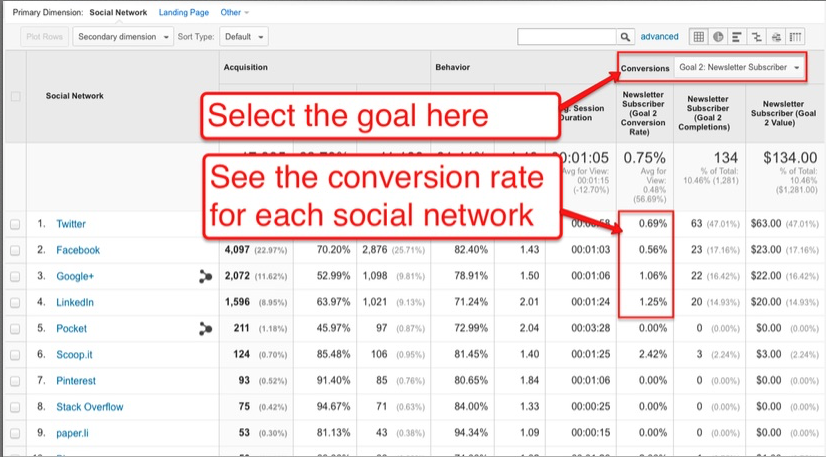
Question: Which social network drives the best traffic to our site?

Report to generate: Channel reports (Acquisition >> All Traffic >> Channels, filtered by goal)

When considering traffic from your social networks, the “best” channels are those that convert visitors at a higher rate. You need to view the data that relates to the specific conversion goals. As you can see in the sample report below, LinkedIn had the highest conversion rate of the four most popular social channels.

social-media-traffic

Click to enlarge

Sample analysis: Once you set up your conversion goal in Google Analytics – subscribing to your newsletter, downloading an e-book, completing a lead-gen form, etc. – this report provides data on how successful your content is at meeting that goal.

Suggested action:

Blog post engagement

Question: Which of our blog posts are the most engaging to visitors?

Report to generate: All Pages Report (Behavior >> Site Content >> All Pages)

If your site page URLs are categorized by content type (e.g., if the word “blog” appears in the URL of every blog post), you can use the search filter on the All Pages report to view only the data related to your blog posts. Then, click on Comparison View to see relative engagement data for your blog posts.

blog-post-engagement

Click to enlarge

Suggested actions:

  • Use high relative engagement to discover the topics that visitors find most engaging – indicating that you should create more content on those topics.
  • Link from high-traffic posts to high-converting posts.

Go forth and analyze

Remember: Tracking and analyzing your performance data is not a one-time task. You need to revisit these reports on a regular basis to ensure that the actions you take are producing positive results and are accounting for any new trends and tactics that may impact your content’s performance.

For a more detailed explanation on analyzing and applying the insights found in these reports – as well as the additional performance questions Andy addresses, in each of the four categories – download the complete e-book, How to Apply Analytics Data to Make Better Content Marketing Decisions.

Want to stay updated on the latest analysis trends and CMI e-book releases? Subscribe to CMI’s blog posts.

Cover image by Joseph Kalinowski/Content Marketing Institute

Please note:  All tools included in our blog posts are suggested by authors, not the CMI editorial team.  No one post can provide all relevant tools in the space. Feel free to include additional tools in the comments (from your company or ones that you have used).

The post How to Uncover Critical Content Marketing Insights Using Google Analytics appeared first on Content Marketing Institute.