Wednesday, January 13, 2016

Is WordPress the Safest Blogging Platform?

Whenever I need to learn more about how to improve my own blogs, Daily Blog Tips is where I turn. The website constantly turns me to new tools and ideas that I can utilize immediately and effectively, thanks to the quality of the posts. You will want to check out this recent post on an interesting idea generator.

If you are reading this blog, then you are more than likely using WordPress. That is to say nothing about this blog or its audience so much as to say that WordPress dominates the market to such an extent that most people aren’t even aware of other blogging platforms, except perhaps Blogger and Tumblr.

Yet is WordPress safe? Every year hundreds of thousands of websites are compromised or shut down by malicious users, and that says a lot about the state of internet security in today’s day and age. How safe can one be with another blogging platform while still creating something people will see?

A lot of that depends on you. WordPress is most certainly the most customizable mainstream blogging platform. You are free to make a lot of changes, but you are also free to make mistakes. There are some things you should know about regarding general blog protection and WordPress safety.

Are Other Platforms Any Better?

To answer the question briefly, not particularly. WordPress has more than three quarters of the market and with a little searching and work can obtain all of the safety feature more expensive platforms have. Some would find it worth it to pay for the services of Squarespace or Svbtle, but extra features do not mean extra security. In fact, there isn’t really any well-known blogging platform that beats an upgraded WordPress in terms of security.

That doesn’t mean WordPress is safe. What it means is that you need to do your research. There may be exceptions to this rule, and relative security does not mean actual security. Other platforms, such as Tumblr, that are more protected against some types of attacks are so restrictive that one could argue they aren’t usable blogging platforms at all. If you’re using WordPress already, you might as well stick with it.

Virtual Private Networks

No matter what blog platform you are using, you are vulnerable while you are using a public network unprotected. Your blog will be tied to an account online and likely an email address to go along with it. Both of these accounts (and any other online account that you use online) are at risk because the login information can be intercepted by an amateur malicious user with a sniffer program on a public network. Once a cybercriminal has that information, no good password or security program can stop them.

The only way to protect yourself on a public network is to use a Virtual Private Network (VPN), which is a service that will connect your device to an offsite secure server using an encrypted connection. This connection keeps cybercriminals (and anyone else) out, allowing you to blog privately from any network you want. You will also be able to access any research materials and websites you want as your IP address will be masked, getting around regional restrictions.

The main thing to concern yourself with is getting the right VPN for the job. You need to look for speed, a large number of servers and strong security measures (like military-grade encryption). It’s recommended you read some reviews to find the best VPN for any blogging platform.

Plugin Usage

A lot of what makes WordPress great all-around is the plugin support it offers. Enterprising individuals and businesses have developed a vast array of plugins for WordPress websites ranging from security tools to eCommerce solutions to small widgets. If it can be programmed, it is probably out there, and some website is using it.

This isn’t necessarily a good thing, and you need to pay attention. Every plugin you install fundamentally changes the functionality of your website or blog. Combined with the popularity of WordPress, this leads to a few things:

-Malicious users develop plugins that are malware in disguise, sometimes with a timed release so that you don’t immediately become suspicious.

-Cybercriminals develop plugins that work and are fine, but also contain a backdoor that allows them access into more sensitive information. Alternatively the plugin might collect information (on you or your readers) secretly and send it back to the creator.

-Established and popular plugins are neglected, and malicious users find security holes to exploit to get into your blog.

There are absolutely safe plugins that you should use, but you need to put safety first. If a plugin isn’t updating itself, then you should probably replace it. If you don’t hear much about a plugin, wait a while and let other people try first. Read reviews and ask people questions. The internet is scary, but it just as often is happy to help. If you use plugins, WordPress is less safe than other platforms unless you are careful.

Proper Management

In what you may see as a trend from the previous two sections, you need to know that this makes proper management of your blog a vital thing for you to keep up with. Regular chores might not be as fun as creating content, but WordPress isn’t automatic. It won’t be safe unless you are regularly doing these things (some directly blog related, some not):

-You need to equip your computer with the latest security suite. The free anti-virus that came with your computer just isn’t enough when you have more than a few of your own files on the line. If your computer is breached, then your blog can easily be compromised through it.

-You need to take some time every month to do a manual review of all blog related files and systems. This includes going through your blog’s pages to see if there is anything out of place and scouring through your computer to make sure no one (or thing) is tampering with it.

-You need to be involved with your blog’s community. Not only will you gain valuable information about how to improve your blog or website, but you will get a heads up if there is a potential security issue with your blog.

-You need to ask yourself if you can keep up with these habits regularly, as they make up a great part of how WordPress can be the safest blogging platform. You should note that with any blog you may have to deal with maintenance, unless you are willing to spend a lot of money.

Conclusion

WordPress is a changing platform and malicious users are always finding new ways to make life difficult for you. WordPress cannot respond immediately to every threat that comes its way and may take several days to respond to a particularly nasty threat. This results in a tumultuous safety landscape.

Nonetheless, we still believe that WordPress can be made into the safest platform through its adaptability and common acceptance. Other platforms are usually too restrictive to be usable or so open that they are indefensible, making WordPress the default choice, especially given the other advantages it provides for your website.

Do you have any thoughts on WordPress’ safety? Has your own decision on the matter been questioned or reinforced? Do you have any security tips that you might want to share with readers? Do you have any stories regarding a cyberattack? Please leave a comment below and join the conversation.

Wanna learn how to make more money with your website? Check the Online Profits training program!


This post is courtesy of: http://www.dailyblogtips.com

Tuesday, January 12, 2016

Here’s How to Integrate Instagram on Your Blog

As you probably know Instagram is the most popular image-based social network these days. They have close to 500 million monthly active users. That is around 20% of the whole Internet population!

What if you could integrate Instagram accounts,feeds,images together with their hashtags directly on your blog or website? It certainly would give a nice touch to your design and even allow your users to discover new images or interact with your Instagram official profile, for instance.

screenshot-1

If you are using WordPress, doing this integration is pretty easy. This Instagram plugin allows you to display multiple public accounts, feeds, images together with their metadata and hashtags on your WordPress website. You can also do this by adding a widget to your sidebar, that will grab images directly from Instagram.The plugin has four image display views- Masonry and Blog style, Thumbnails and Image browser, to display the images both in thumbnails and in full size.The feeds can be displayed in three options: pagination, infinite scrolling and load more images upon clicking in the “more” button. Images can be sorted based on the likes, comments, date or randomly. You can also select whether to show likes,comments, description, user bio and followers count for the images.

You also control what happens when the user clicks on the image. The visitors can be redirected to Instagram, or the image can open in a lightbox. You can customize lightbox width and height and also select a transition effect from the available 15 ones.The images can be viewed as a slideshow as well. The lightbox supports filmstrip option and is capable of showing image info within it. You can also enable fullscreen view, comments and share buttons in the lightbox and add a link to the Instagram account.

Besides the mentioned features that are available in the free version, Instagram Feed WD Pro provides support and regular updates at very low prices.

Overall it’s a very cool and advanced plugin to display Instagram images on your site, so check it out! You can also view the instagram demo to see how the plugin works.

Wanna learn how to make more money with your website? Check the Online Profits training program!


This post is courtesy of: http://www.dailyblogtips.com

6 Tools to Help Turn Trends Into Valuable Content

tools-trends-content-cover

Evergreen content is a staple of a solid content strategy. While it pays off in the long term, it isn’t always ideal for traffic boosts. You want the occasional piece that draws people in droves, and that takes a different content tactic.

Covering relevant timely and newsworthy content is a great way to grow your site audience and take advantage of trends that get people more interested and thus more engaged.

Trending content is anything new and hot that has the Internet buzzing. Many successful websites will do a 60-40 split between evergreen and trending content to take advantage of both methods. (The proper split depends on the nature of your website, niche, etc.) Having both will bring in new readers and keep them coming back.

But how do you find out what is new and trending? Using these helpful sources, that’s how:

Monitor related subreddits

Reddit has grown over the years to become a social hub for every topic imaginable. While it is highly controversial at times (such as discriminatory subreddits and potential hoaxes), it is an incredible collection of hot topics you may not have even known had captured the eye of the Internet community.

There is a reason that aggregation blogs like BuzzFeed have a tendency to snatch content from Reddit – whole posts that do nothing but repost comments made in hot threads. Even huge news outlets like CNN have started doing this.

The key for your success is to pick subreddits that best fit your niche and are still popular and active enough to provide a regular feed of trending content. Use these tricks to find the most relevant subreddits.

Featured tool: Use your inbox to monitor trending comments with these IFTTT recipes to automate the sending of relevant Reddit updates to your email. For example, this recipe emails new hot stories from your favorite subreddits:

IFTTT-recipes

Look at Twitter and Facebook

Both Twitter and Facebook have their own trending topics section. For Twitter, it could be a hashtag, a keyword, a recent event, or a specific post on its site. Twitter Trends are personalized and localized for you. Facebook’s trending section highlights the most commented or shared news stories from around the world.

While these only give a glimpse of what is popular on that specific network, they are a good indication of wider interest. Given that these two platforms are the most popular social communities, if the topic is trending there, it is almost certainly ripe for writing.

Featured tool: DrumUp crawls Twitter, Facebook, and LinkedIn, finds the most shared content based on your keyword settings, and creates a handy feed for you to read and post to your social media streams for higher engagement.

DrumUp

Optionally, DrumUp sends a daily email with trending content for you to quickly see if there’s anything worthy of coverage on your site.

DrumUp-recommended-posts

Overall, I find this tool valuable for monitoring trending content around my topics of expertise. It’s also a great productivity tool too, thanks to its free digest feature.

Look at sites using clickbait headlines

Clickbait headlines are a bit of a mixed subject among marketers. On one hand, they have come to be synonymous with dishonesty and can annoy the reader. On the other, when done right, they are incredibly effective and can lead to serious jumps in traffic and visibility … not to mention ad revenue, a significant benefit for most websites.

To see examples of it being done correctly, you only have to look at sites like BuzzFeed and Upworthy. Both use headlines that draw people to click on their content, but they mostly deliver on what they promised in those headlines.

Use these more reputable sites for inspiration. Not only can you get ideas on how to word your blog posts and promote them on social media for the greatest impact, but you can find out what is bringing the most viewers at any moment.

Featured tool: Obviously I have no time to check and read those sites on a regular basis, so I just created an aggregated feed for those I found most useful and educational for me as a content marketer. To create an aggregated feed, use WordPress RSS aggregator to easily combine all your feeds into one.

WordPress-RSS-aggregator

The aggregated feed is hosted on your site and can be added to an RSS reader of your preference or you can even email the feed items to yourself using tools like FeedMyInbox.

If you don’t feel like checking these feeds regularly or seeing updates in your email, you can archive your aggregated feed using Cyfe.

Cyfe

Cyfe fetches your feed daily and archives old clickbait titles: This way you create a searchable archive of catchy headlines that evolve around your niche.

Bonus: Find related topics to any trend

Let’s say you come across a trend that you feel like covering on your site. How do you turn it into a good in-depth article quickly? (Posting on a hot topic needs to be fast while it still trends). My way is to identify related topics and pack them into one article.

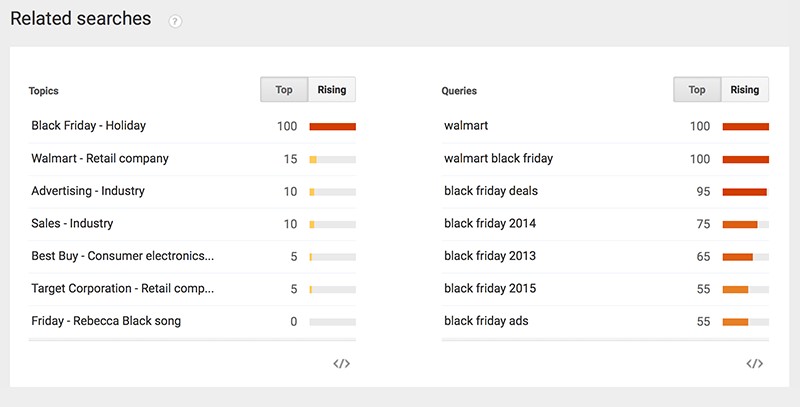
For yearly popular trends I use Google Trends. The only downside is that Google Trends identifies trends more slowly than Facebook and Twitter but it is great for covering more sustainable trends:

Google-Trends

Click to enlarge

Google Trends also lets you search by category and country, seeing what is hot right now. You can see how those trends have grown and ebbed over time, compare different searches, see trending news stories, look at top charts, and subscribe to certain topics to get updates via email.

For more recent trends, I use Hashtagify to quickly identify and research related topics:

Hashtagify

What tips for identifying trending content topics do you have? Let me know in the comments.

Please note: All tools included in our blog posts are suggested by authors, not the CMI editorial team. No one post can provide all relevant tools in the space. Feel free to include additional tools in the comments (from your company or ones that you have used).

Want to keep up on the trends in content marketing? Subscribe to our daily or weekly CMI blog.

Cover image by Joseph Kalinowski/Content Marketing Institute

The post 6 Tools to Help Turn Trends Into Valuable Content appeared first on Content Marketing Institute.

Monday, January 11, 2016

Need a Calendar for WordPress? Check Out Event Calendar WD

If you have a website where you usually need to share the events you organize or participate, the best way is adding a nice calendar on which you will showcase all the events in a professional and structured way. This will add a value for your users who can easily follow your upcoming events.
There are bunch of WordPress calendar Plugins that you can consider to use for this purpose but sharing my experience I’d strongly recommend you Event Calendar WD which will do all the work for you.

I really like the variety of event display modes they suggest: Month, Week, Day, List, Map, 4 Days, Posterboard. You should enter the demo page to see how elegant each view looks in reality. If you are already in the demo page, don’t forget to check also theme skins which can be easily customized to meet the design needs of your website.

Another great thing about this WordPress calendar plugin is that it is truly responsive and has nice structure on any device screen.

My other favorite features in this plugin are:

-No restriction on the number of calendars or events
-Ability to create categories for events
-Structured event markup
-Ability to create venue-list and adding an event just select from the list not write venue info each time again
-Ability to manage organizers’ data
-Google Maps integration
-Social share buttons
-And much more

Besides all this really advanced features the pro version of calendar also comes with bunch of integrations and add-ons which add really cool functionalities.

Event Calendar WD has the following Integrations that you’ll really love to have:

-Facebook event integration
-Google calendar integration
-iCal integration

Here I want also to share the list of Event Calendar WD add-ons that you may want to give a try:

-Event filter bar
-Event countdown (I really enjoy this add-on)
-Upcoming events widget
-ECWD export/import

I’m sure that this well structured calendar will add extra charm to your website and will give you better experience of managing events through your website.

Wanna learn how to make more money with your website? Check the Online Profits training program!


This post is courtesy of: http://www.dailyblogtips.com

Your Top 3 Video Distribution Questions Answered

video-distribution-questions-cover

As a head of production, the business of getting video in the hands of an audience is something I ordinarily leave to our clients. The issue is, though, that marketing professionals – my main points of contact – tend to focus on other areas and are at a loss when it comes to video distribution.

Though traditionally not within the remit of a creative staff, the questions I get more than any others are about exposing video to the widest possible audience. Using a combination of independent research and common sense, I’ve come up with a few answers to three of the most frequently received questions about video distribution. I’ve found that sharing the answers not only makes my life a little easier, it’s also proven quite useful to content marketers as well.

Question 1: Should we host or post?

In other words: “Just where do I put the thing?”

You have two choices, more or less:

  • Host it on your site with a player like Vimeo or Wistia
  • Post it to YouTube

While you can do both, it’s seldom advisable. You don’t want YouTube to cannibalize potential hits (and other actions) from your company’s online home. The truth is that each approach has advantages and disadvantages.

People use YouTube every day. They’re comfortable with it, and if they’re looking for video content, it’s their first port of call. Every day, people collectively watch hundreds of millions of hours of videos on YouTube, and if your clip is highly sharable, it could gain traction. On YouTube, you also can add metadata to your video to make it easier for this huge audience to find. On the other hand, YouTube has zero interest in your content. In fact, it prefers when people don’t watch the entire video because it means viewers are flitting from YouTube-hosted video to YouTube-hosted video, and therefore watching more ads.

Hosting the video on your site automatically limits your video’s total reach. But there are advantages – quality over quantity, after all. You can:

  • Optimize the video’s landing page for search engines
  • Include other videos in the playlist (encouraging visitors to stay longer on your site)
  • Include calls to action
  • Hide valuable video content behind sign-up forms, helping bolster your subscriber lists

And, from a technical perspective, if you’re a stickler for visuals, players like Wistia allow you to fix the resolution of your video – unlike YouTube, which automatically downscales for slower connections.

The better answer to host or post is …

  • YouTube for brand awareness, profile-raising goodness
  • Your own site for lead generation

It’s the difference between going fishing with a big net or with a customized angler’s rod. You’re hoping to catch big numbers with enough of those being the viewers you want – or you’re hoping to target only the viewers who would work for your business.

Question 2: Which social network should we use for video?

This is a tough one. With so many conflicting surveys about the best channels for social media lead generation (and general marketing activity) it’s hard to know what to believe. A study quoted in this Forbes article put Twitter firmly ahead of the B2B competition; a study from Econsultancy crowned Facebook the B2B winner; and a report from LinkedIn’s Technology Marketing Community found that, surprise-surprise, LinkedIn was the only game in town.

The answer …

As a rule, the best channel for social media engagement is the one where your target audience is. In most cases, this will be one of “the big three” – Twitter, Facebook, or LinkedIn – and wherever you post it, you’ll need to take a specific approach. The video’s accompanying social post should be tonally appropriate for the network.

Twitter’s 140-character limit is an obvious concern: links, video or otherwise, occupy 23 characters, leaving 117 characters for your message. This isn’t necessarily to your disadvantage: statistics from HubSpot indicate that posts with fewer than 100 characters receive 17% higher engagement.

Brevity also is encouraged on those networks without limits: Facebook posts with 40 characters receive 86% more engagement than longer updates, and LinkedIn posts between 16 and 25 words receive more shares on the whole.

Embedding videos in a social post is simple, and usually preferable to linking to an external video; you don’t want to make your prospects do more work than they have to. If you’re cross-posting to multiple networks (i.e., Facebook and Twitter), there’s an argument for using YouTube because you don’t really want to divide and conquer when it comes to view counts, and YouTube-hosted files embed with both platforms easily enough.

Automatic playing of videos on social media have proven to be a point of contention. Facebook and Twitter use silent autoplay, which has removed much of the user annoyance associated with video autoplay and has led to a 58% increase in engagement.

But autoplay also muddies the value of social view counts as a video content marketing metric. You don’t really have a perfect sense of who’s actually watching the clip vs. who’s scrolling by it without a thought. Autoplay complicates things further for promoted posts, which have the same viewing metric problem but at a potentially higher price. If a viewer “watches” three seconds of any Facebook or Twitter video, the company is charged. You could end up paying for functionally useless views.

Autoplay on social networks needs to be considered at the outset of the video creation and the content tailored appropriately. (For example, do you need to include animation or text overlays to ensure that the viewers get the message regardless of whether they hear the video?)

Question 3: Should we incorporate video in email?

When it comes to things like email, people tend to be a little confused about or skeptical of its value. Often they ask if they should even bother to email the new video to their prospects at all.

This trepidation is not entirely inexplicable. A report from McKinsey indicates that email is losing some ground to social media as a distribution platform of choice. It also doesn’t help that Outlook, Gmail, and Yahoo don’t support HTML5 video, meaning the recipient always has one more click to watch it.

The answer…

Don’t neglect email distribution for video. It’s still a useful medium. The same McKinsey report indicates that it’s a far more effective way to generate leads and customers. If you’re already doing email marketing, good video content will yield measurable improvements. Research from Email Monks illuminates its specific value: a 55% improvement in click-through rates.

video-email-infographic

Source: Video Email Infographic

You’ll also want to autoplay the video in the email – always, without exception. You typically can use an image link within the email – a frame from your video with a play button imposed over it:

autoplay-video-frame

With this email marketing, you really want to host the video on a dedicated landing page (complete with calls to action) on your site. It gives you superior control over the experience and could be the beginning of a successful customer journey if you can funnel the viewers into other parts of your site. It also means you can gather metrics on how well the video works as a content marketing asset, enabling you to know the most successful length of video, type of video, and video content for your targeted viewers.

For more answers to your content marketing questions, subscribe to CMI’s blog posts.

Cover image by Joseph Kalinowski/Content Marketing Institute

The post Your Top 3 Video Distribution Questions Answered appeared first on Content Marketing Institute.

Sunday, January 10, 2016

Grow Your Pinterest Following: 5 Simple Steps for Brands 

grow-pinterest-following-cover

Pinterest is the fastest-growing social media platform in terms of user numbers. Compared to Facebook’s 6% member growth, Pinterest experienced a huge 57% jump in members in 2014 and many sources project that the site will hit 50 million active users by the end of this year.

However, according to our annual research, B2C marketers are more likely than B2B and nonprofit marketers to use Pinterest, but the majority of users in all groups don’t consider the platform to be effective.


B2C marketers are more likely than B2B and nonprofit marketers to use @Pinterest via @cmicontent #research
Click To Tweet


Chart_Platforms

Compared to customers who are referred to a product by Facebook, customers who reach a product via Pinterest are 10% more likely to purchase that product, according to Wayfair. Additionally, according to Digital Buzz Blog, 25% of Fortune 100 companies maintain Pinterest accounts, showing that the platform is truly one of the best places to promote your business.

These foundational tips can help you get started optimizing your Pinterest profile to get better visibility and engagement for your brand.

1. Make your account easy to find

Set up a Pinterest Business account.

Pinterest Business

Make the account as easy as possible for your fans to find. Ensure that your business name is self-explanatory and easy to spell. The ideal length of a username is 3-15 characters. You should also take the time to verify your site and include links to other social media accounts for increased crossover and visibility.

Finally, you’ll need to fill in the brief business description, including keywords, which will appear at the top of your Pinterest home page. Although the allotted space for this description is 200 characters, it can be as short as you’d like as long as it captures the essence of your company. Take Gap, for example:

Gap Screenshot

2. Add a Pin It button to all your content

To increase crossover between your website and your Pinterest account, add a Pin It button to the content on your website. This allows people to connect with and share your content on Pinterest. Since the average pin is searchable months after it has been posted, you can bet that by pinning your content, your users can help you increase its life span significantly.

pinterest-pinit-button

3. Encourage user-generated content

According to Sprout Social, user-generated content is 35% more memorable and 50% more trustworthy than other types of media creation, which means user-generated content should play an important role in your Pinterest strategy.


UGC is 35% more memorable & 50% more trustworthy than other types of media creation via @SproutSocial
Click To Tweet


To make the most of user-generated content, create a collaborative board that allows your followers to post photos of how they interact with your product, good, or service. Take Gap, again, which has a board called Styld.by You that allows fashion bloggers and other clothing aficionados to show off how they wear Gap clothing, or Starbucks, which has a board dedicated to its user-generated white-cup art.

Gap Styl.d by you board

Starbucks Cup Art Screenshot

Encouraging collaboration is a great way to get your users to engage with your brand and the collaborative, user-generated content boards are sure to be a hit.

4. Make sure your boards reflect your business

If you’re a tech company, there’s a good chance that boards dedicated to pie recipes are going to confuse your fans and not get much traffic. It’s wise to avoid getting tangled in the casual environment of Pinterest and to keep your boards dedicated to the industry within which your business operates. Take GE, for example, whose Pinterest boards offer users an inside look at complex machines as well as hilarious tech, electricity, and software-related “Hey Girl” memes, and images of the work GE has done around the world. These boards serve two important purposes: They are on-brand for GE itself, and they promote interest from a wide variety of users. To glean the same results for your business, keep your boards focused and seek to fill each with quality, useful, and interesting content.

GE Pinterest

5. Make the most of rich pins

For marketers who want to include more information in their pins, rich pins are a great place to start. There are six types of rich pins and each allows marketers to add detail to the pin itself:

  • Place pins – users include address, phone number, and map
  • Movie pins – users provide details about reviews, ratings, and cast members
  • Product pins – users include purchase locations, pricing, and availability
  • Article pins – includes the article headline and users provide detail about the author, story, and link
  • Recipe pins – users offer details about serving info, cooking times, and ingredients
  • App pins – users provide information about an application, including pricing, and description

To get started using rich pins, you first need to decide which type or types fit your brand best. Once you’ve done that, you’ll need to prepare your site by including the correct metatags. Then, the only thing left to do is to apply to get the rich pins on Pinterest. For more information on how to apply for and use rich pins, check out this tutorial. Once they’re installed on your site, rich pins can be a fantastic tool for providing a direct link between your customers and your product. Since 25% of consumers purchase a product after seeing it on Pinterest, according to Compete research, rich pins have the potential to increase your bottom line and drive more sales.


25% of consumers purchase a product after seeing it on @Pinterest via @compete #contentmarketing
Click To Tweet


Etsy rich pin screenshot

Conclusion

As it stands now, Pinterest has virtually unlimited engagement potential and businesses that take these five simple tips to heart will see their Pinterest following and engagement grow exponentially. Whether you’re a tech brand or an e-commerce company, it’s undeniable that Pinterest can help you connect with your customers, make more sales, get people excited about your business, and spread the word about your services around the web. Now that’s something worth pinning about.

Ensure you gain the best tips and insight to improve your content marketing, subscribe to the Content Marketing Institute blog.

Cover image by Joseph Kalinowski/Content Marketing Institute

The post Grow Your Pinterest Following: 5 Simple Steps for Brands  appeared first on Content Marketing Institute.

Saturday, January 9, 2016

This Week in Content Marketing: Ad Blocking Is 2015 Phrase of the Year

ad-blocking-phrase-podcast-cover

PNR: This Old Marketing with Joe Pulizzi and Robert Rose can be found on both iTunes and Stitcher.

In this first episode of 2016, Robert and I discuss three articles that dig into the increasingly murky area of native advertising. Only one thing is clear: Consumers can’t tell the difference between editorial and sponsored content. Ad blocking and podcasting dominated the key trends of 2015, and we explain why publishers must reduce “content friction” to keep their audiences happy. Next, we explore how podcasting is taking a lead role in innovating advertising, and the opportunities this is likely to create. Finally, we disagree with Jason Calacanis’ prediction that Snapchat is going to be the next big thing. Rants and raves include a clear definition of content marketing, the misguided ravings of “digital dissenters” and a podcast that explains why you shouldn’t build your content house on rented land. We wrap up the show with a #ThisOldMarketing example of the week from Pennsylvania Rural Electric Cooperative.

This week’s show

(Recorded live January 4, 2016; Length: 1:04:42)

Download this week’s PNR This Old Marketing podcast.

If you enjoy our PNR podcasts, we would love if you would rate it, or post a review, on iTunes.

1. Content marketing in the news

  • Consumers can’t tell native ads from editorial content (6:34): Consumers have difficulty distinguishing between native advertising and editorial content, according to a new study by researchers at Grady College in Georgia. In a related story, The Interactive Advertising Bureau last week expressed mixed feelings about the Federal Trade Commission’s new guidelines for native advertising. Finally, the U.K.’s Advertising Standards Authority slammed The Telegraph for not making it clear that an article and video on its website were paid for by Michelin. Robert and I agree that consumers don’t have a clue which content is sponsored, even if it says “sponsored by” or “presented by.” We suggest the stance the IAB ought to take to provide clear guidance for publishers and advertisers, as well as greater clarity for consumers.
  • The 10 key media and publishing moments of 2015 (16:58): The last 12 months in media and publishing have been transitional rather than revolutionary, because the most seismic changes began several years ago. As a result, during 2015 most publishers were focused on coming to terms with what these trends mean for their businesses, observes FIPP. Other big issues on this list include ad blocking, podcasting, Snapchat Discover, and Periscope vs. Meerkat. Robert and I agree that these moments point to a single mega-trend in content consumption, as well as a need for publishers to reduce “content friction.”
  • Podcasts: Where people choose to listen to ads (24:28): Podcasts are transforming advertising. They’ve become pioneers in creating a different commercial model where audiences are choosing to not skip the ads, but in some cases rewind to hear them again, says Corey Layton in this article from mUmBRELLA. He says a growing number of podcasters have found a way to create commercials that are just as entertaining as the content that surrounds them. Robert and I agree that the opportunities are huge for commercial messages to be more tightly – and creatively – integrated into podcasts.
  • Snapchat is going to reach a billion users thanks to Generation S – the smartphone generation (31:16): Snapchat is going to reach a billion users, challenging Facebook, YouTube, and mainstream media, for the attention of “Gen-S” — the smartphone generation – predicts Jason Calacanis. What’s driving his thinking on this prediction? DJ Khaled, who has built a huge following not only promoting the products he uses, but providing his followers with tips on how to be as successful as he is. Robert questions if Khaled will be successful beyond Snapchat, which he views as a fad. I disagree.

2. Sponsor (39:12)

  • Intelligent Content Conference 2016: Are you serious about content marketing? Then this is your event. ICC 2016, March 7-9 in Las Vegas, is the one content strategy event specifically designed for marketing practitioners. In order for you to be truly effective at your content marketing, you need to scale your content, leverage the right technology, easily repurpose and reuse content, and deliver content to the right person, at the right time, regardless of device. That’s what ICC is all about. Learn more and register at http://IntelligentContentConference.com. Use the code PNR for $100 off when registering.

ic-2016-pnr-promo

3. Rants and raves (42:57)

  • Robert’s raves and rant: Robert has two raves and a rant this week. The first rave is for Jay Acunzo’s awesome article that defines content marketing in a simple and fun format that features the Jargon Monster and the Naked Little Truth. The second rave is for an excellent article from Ad Age entitled A CMO’s Guide for Marketing Transformation. It’s a wonderful checklist for approaching digital marketing as a CMO or marketing leader. Finally, he rants about a Washington Post article that profiles “digital dissenters,” who sense that human needs are getting lost in the tech frenzy. Robert doesn’t take issue with the article itself, but with the “team human” supporters who seem to be making much ado about nothing, in his opinion.
  • Joe’s rave: I’m intrigued by Michael Stelzner’s recent podcast with Mark Schaefer and Mitch Joel, in which they discuss why you shouldn’t build your content home on rented land. Within this 40-minute session, I heard statements I totally agreed with, but also ideas that I vehemently opposed. My favorite idea from Joel: To be successful, we must adopt an integrated network strategy that has three main elements, which I outline in the podcast.

4. This Old Marketing example of the week (58:42)

  • Pennsylvania Rural Electric Cooperative: In the 1930s, private power companies in the U.S. found it unprofitable to extend their electric power networks into rural areas. To address this challenge, rural communities formed cooperatives to build the infrastructure needed to transmit power to their communities. The Pennsylvania Rural Electric Cooperative (PREC) is one of those organizations. Today, PREC provides electricity to several hundred thousand households and businesses in rural Pennsylvania. The cooperative recently celebrated the 50th anniversary of its monthly PENN Lines magazine, which is focused on life in rural Pennsylvania, including social, political, economic, community development, health and education issues. It also contains content that informs consumers about better and more efficient uses of electricity. Today, PENN Lines has over 166,000 subscribers, which represents a large percentage of its customers. The magazine is entirely paid for via ads and sponsorships. It’s an awesome example of an organization using a content vehicle to deliver a better experience to its constituents – and a great example of #ThisOldMarketing.

pennlines

For a full list of PNR archives, go to the main This Old Marketing page.

How do I subscribe?

itunes logo

stitcher logo

The post This Week in Content Marketing: Ad Blocking Is 2015 Phrase of the Year appeared first on Content Marketing Institute.